Air Flex Solenoid
INS
If there is a problem with the Air Flex solenoid, complete the following steps in this order.
1. Make sure power is getting to the solenoid. Unplug the table. Disconnect the colored wire to the coil that
controls the unresponsive table function. A diagram is attached below to identify the coils. Plug the table in and use a volUohm meter set to test 120VAC. Set the table controls to the function with the problem. Test between the colored wire and the ground or neutral. The meter should show approximately 11Svolts. If not, it is probably a bad switch in the control box or a bad wire.
2. Test the coil. Unplug the table again. Keep the identified wire from Step 1 disconnected. Also, disconnect the neutral to that same coil at its yellow connector. Set the meter to Ohms "R x 1" and test between the colored wire and the neutral. The meter should read approximately "30". If not, replace the coil.
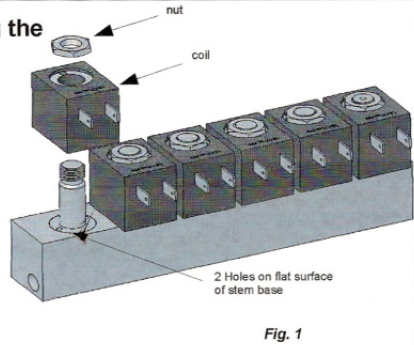
3. Check for particles in the solenoid. Loosen and remove the nut on top of the solenoid as pictured in fig.1. Remove the black coil. Older coils also have a brass washer/cover below the top nut.
When the base of the stem is visible, use a hammer and a small punch or screwdriver to tap in the two holes to begin to unscrew it.
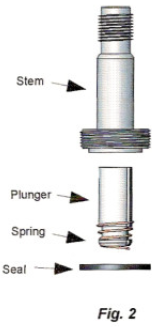
With the stem removed from the recess in the manifold, check for any particulate in the recess that could be impeding air flow. Check around the outer seal ring and also the hole at both ends of the stem. Reassemble the solenoid.