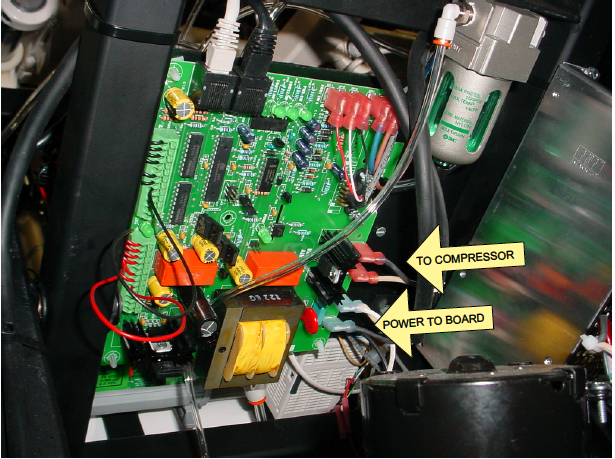
ACCESS THE TABLE - 2 approaches
- WITH TOOLS to avoid lifting
- Use the height pedal to elevate the table.
- Unplug the table.
- Remove the screws that secure the plastic enclosure to the top and base.
- The larger section that was attached to the top frame can be removed by grasping the two sides and pulling out as you pull down. to release it from the arm rest bars.
- WITHOUT TOOLS
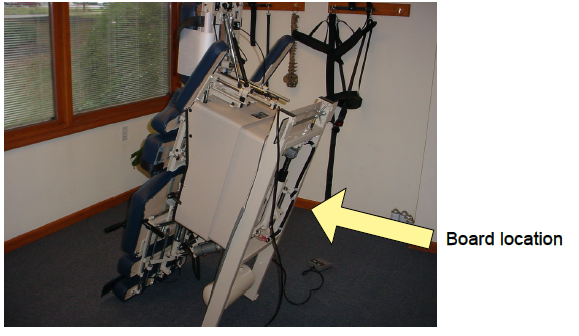
- Retract the ankle cushion. Use the height pedal to adjust the height to about half way.
- The board can be accessed by standing the table on end. Lift at the head end until the table rests on the foot cushion.
TROUBLESHOOT
Disconnect the power cord from the wall receptacle.
- Unplug the black and the white power wires going to the board. Follow those wires down to where they connect near the capacitor and disconnect the black and the white wires there. Do a continuity test on the black wire then on the white wire. If there is continuity skip to step 2. If there isn't then that black and white wire jumper has to be replaced.
- Reconnect the wires that were unplugged. Next plug the table back in and press the green power button. If the green button stays on then try wiggling the ethernet cable that plugs into the board. If the green button light goes out then the ethernet cable should be replaced. If it does not go out then go to step 3.
-
In the control box unplug the green power button from the board and replace it with a button from another option. This will test if the green power button is bad. If the light stays on and does not go out then the green power button needs to be replaced. If it goes out then the green board will have to be replaced.